
Free trackpad correction software
ASUS Smart Gesture is a free driver program to enable more touchpad features on ASUS laptops. This utility software is developed and published by ASUS and only functions with their machines. The freeware operates with Microsoft Windows 32- and 64-bit systems; additionally, the Smart Gesture app is already installed into Windows 10 versions.
Top Recommended Alternative

What is ASUS Smart Gesture?
ASUS computer systems created the Smart Gesture driver to stay up to date with the standardized technology that has emerged. Apple Mac and Microsoft Windows operating systems now include in all of their devices the capabilities of multiple finger scrolling and tapping along with a multitude of other customizable trackpad tactics that ASUS did not offer leading up to the Windows 10 release.
Recognizing the necessity to include the requested colloquial actions into their devices, the ASUS team devised a system that will adapt the machine to peoples’ preferred gestures, which include reformed clicking, dragging, scrolling, tapping, etc. While the touchpad driver is helpful to an extent, user reviews express software issues: problems performing the declared actions, lag, etc.
How do I open the ASUS Smart Gesture?
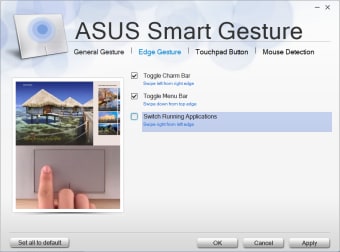
Upon opening the ASUS driver from the device manager, the window will have an upper menu bar: ‘Gesture’, ‘Mouse Detection’, and ‘Mobile Control’. Within the ‘Gesture’ tab, an encasement with animations being displayed is adjacent to columns of text options: ‘One Finger’, ‘Two Fingers’, and ‘Three/Four Fingers’. Each panel within this window can be tailor-made to the user’s touchpad preferences.
Beneath the ‘One Finger’ pillar, people can select and unselect the options: tap to choose, double touch to activate, double touch while holding then drag. Their capabilities are labeled as ‘Select’,’Activate’, and ‘Drag’. Within all of the sections regarding the number of fingers, people can choose to select all, some, or none of the action choices.
The second panel displays the abilities possible with two fingers: tap to display menu, swipe around horizontally or vertically, pinch to zoom in and out, and rotate with two fingers clockwise or instead counterclockwise.
These actions are correlated to the ‘Show pop-up menu’, ‘Scroll’, ‘Zoom’, and ‘Rotate’. There is an additional specification under the ‘Scroll’ category which details the preference of either moving in the same or reversed direction to scroll with two fingers.
The bottom area is dedicated to ‘Three/Four Fingers’ selections: whether or not the community desires to tap or swipe with multiple fingers to show the menu. This motion would initiate Microsoft Cortana, notifications, and task views or switch pages within the browser. Lining the bottom of this window are the button choices: ‘Set all to default’, ‘OK’, ‘Cancel’, and ‘Apply’.
Additional ASUS touchpad solutions
On the upper menu within the user interface, the second tab is ‘Mouse Detection’ which allows the application to automatically disable the touchpad when a Bluetooth adapter or USB cable is connected to a handheld mouse. If this option is not selected, then people will have to implement this function manually when they want to sync a mouse to their laptop computer.
The final tab within the Smart Gesture window is ‘Mobile Control’. If users have the Remote Link app installed on their mobile and tablet devices, then they are able to control their computer through Bluetooth or Wi-Fi connections like a remote controller. The application is only available on Android electronics.
The option to install and enable Remote Link is accessible in this area along with the possibility to restart the server. Additionally, if anyone does not want to be reminded of the ability to associate the Remote Link app with their device, then they can select the box next to ‘Always hide the notification’.
Alternative touchpad driver download
The Synaptics Touchpad Driver is an alternate installation option that allows people to customize their clicking, pointing, and scrolling user experience. Both of the toolsets are offered for free.
Personalize touchpad settings
By installing the ASUS Smart Gesture, users will be offered a variety of modifications to give them the best experience with their ASUS device. The driver can enable one, two, three, and four-finger touch options: rotate, scroll, zoom, etc.
Visit the ASUS website to evaluate its latest update. ASUS does not consistently provide new releases to the community. Within their official site, scan through their press and privacy policy pages to search for answers to any inquiries.